
Study Tables in Bangalore: Adult Size & Setup Guide
The dining table has become the office again. Your laptop sits between a water bottle and someone else's books, the only power point is behind the wardrobe, and by evening your shoulders sit higher than they did at breakfast. A study table for an adult has to solve that whole scene and still look calm in a shared room.
Choosing a study table in Bangalore starts with fit. Height, depth, chair, screen, lamp and the swing of the door decide whether you can work for an hour or for a full day. A handsome top that is too shallow, or a drawer box that hits your thighs, will feel wrong even in good timber. The checks below are the questions to settle before a made-to-order study table is specified: room size, clearance, storage and seating. At Gulmohar Wood Works, we make custom solid wood study tables in our Lingarajapuram, Bangalore workshop, with dimensions and storage discussed around your room and daily use.
Table of Contents
- Standard Study Table Dimensions for Adults
- Matching Height, Chair, Screen and Daily Hours
- Task Lighting and Movement Space
- Fitting a Study Table into an Indian Room
- Materials, Storage and Build Quality
- Measure Your Room and Order a Study Table in Bangalore
Standard Study Table Dimensions for Adults
Start with the dimensions that control posture: top height, depth, width and the space underneath. Adults doing laptop work at a desk typically need a tabletop height of 720 to 750 mm, a depth of at least 600 mm, and a width of 1000 to 1200 mm for one person with a laptop, a notebook and a mug. A printer or a second workstation needs additional width. Lay out the actual equipment and allow a separate comfortable working area for each person rather than treating 1400 mm as a universal two-person size. Treat these as starting numbers to check against your body and the room.
Indian healthcare-facility ergonomics guidance identifies 720 mm as the seated workbench height and 600 mm as the typical minimum depth, and it recommends about 750 mm of depth when a flat-panel display sits on the main surface, according to the HFG India ergonomics guidance. The extra depth is geometric: the screen can sit farther from your eyes while a keyboard, a notebook and your forearms still have room. Working height and legroom are design parameters to set before finish, drawers or cable trays.
| Dimension | Recommended range | Why it matters | Watch for |
|---|---|---|---|
| Tabletop height | 720-750 mm | Matches seated writing and laptop use | Must suit seated elbow height |
| Tabletop depth | 600 mm minimum; about 750 mm with a flat-panel display | Places the screen at a comfortable distance and leaves forearm room | Shallow tops push the screen too close |
| Tabletop width | 1000-1200 mm as a one-person starting point; allow extra width for equipment or a second user | Fits a laptop, notebook and mug without crowding | Narrow tops limit side-by-side work |
| Knee clearance height | About 650 mm from the floor to the underside | Lets the legs sit square under the top | Thick aprons and drawer boxes reduce it |
| Clearance under the drawer | At least 50 mm above the seated thigh | Keeps the knees clear of storage | Check drawer depth against the seated thigh |
A correct nominal height can still feel wrong. A thick apron, a deep drawer box or a central support steals knee space. You slide forward, your shoulders hike, and your lower back takes the load even though the tape says the top is right. In a shared Indian bedroom this shows up fast, because the chair often has to clear a bed edge or almirah door before you can sit square.
Check the underside as carefully as the top. If your thighs touch wood when you sit square, the table is too tight in the place that matters.
For a custom solid-teak table, I would set the final height from your seated elbow height and use 720 mm only as a check. Thigh thickness sets the gap you need under any drawer. Measure both before anything is cut, and let those two body numbers override the starting range.
Matching Height, Chair, Screen and Daily Hours
Plan the workstation around your body, available room and daily tasks. A study table works as one part of a system that includes the chair under you, the screen in front of you and the breaks you take. A bigger or more expensive solid-wood table still fails if any one of those is wrong, and a fixed-height desk stays wrong when the chair, the screen or the break pattern is wrong.
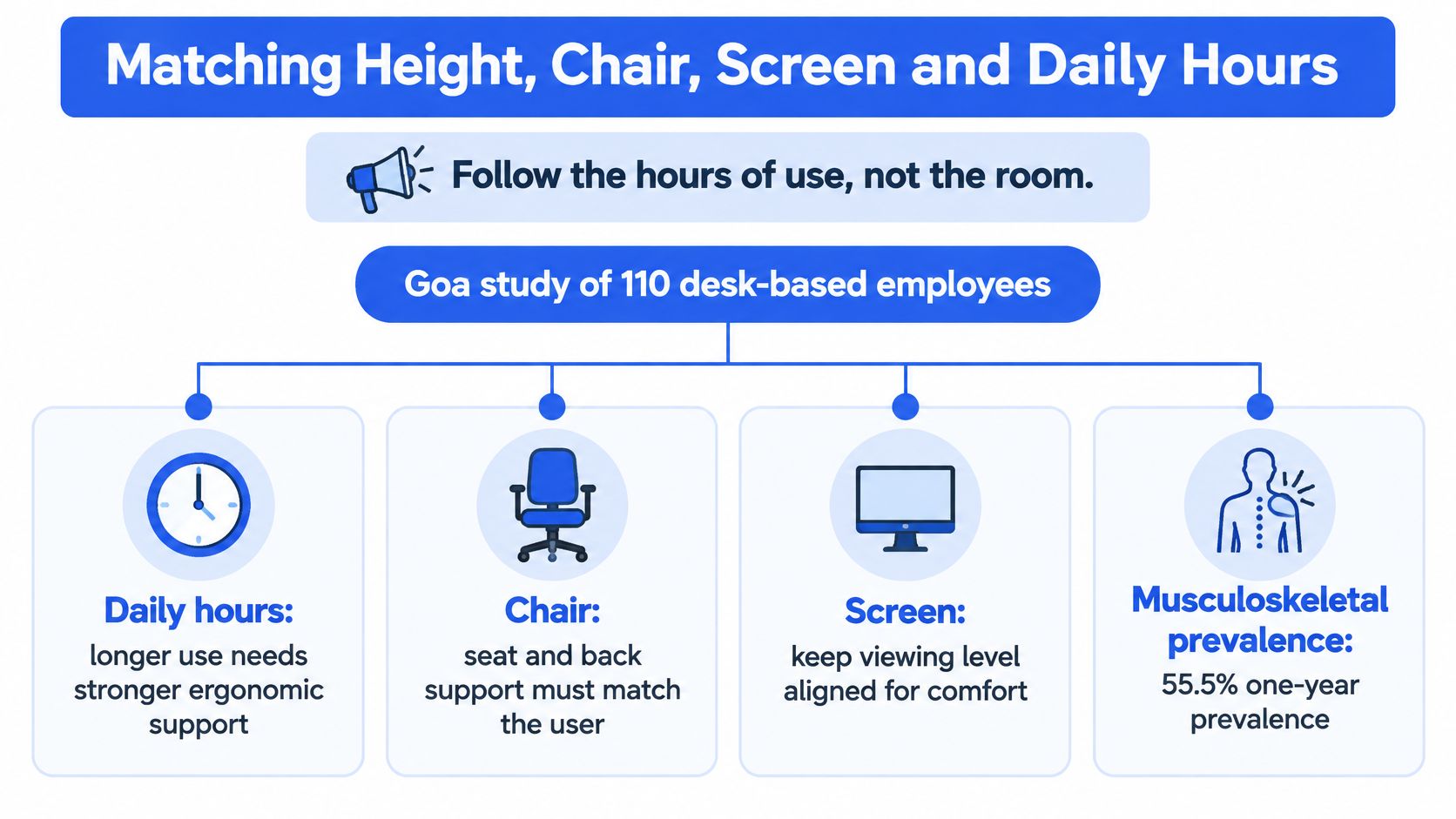
A Goa study of 110 desk-based employees recorded a one-year musculoskeletal-disorder prevalence of 55.5% for the lower back and 48.2% for the neck. The same study found that 53.6% did not take regular postural breaks, that 56.4% had chairs with poor lower-back support. Of those 62 people, 44 reported lower-back pain: 71% of that subgroup, or 40% of all 110 participants. This was a cross-sectional study in one hospital, so the results describe associations in that group rather than proving that a particular desk or chair causes or prevents pain.
What changes as the day gets longer
The examples below are planning suggestions, not medical thresholds. Comfort, individual fit and opportunities to change posture matter at every session length.
| Daily use | Table setup | Chair | Screen and input |
|---|---|---|---|
| Under 1 hour, reading or writing | 720-750 mm height, 600 mm depth | Chair with a firm seat | Laptop or book stand |
| 1-3 hours, study sessions | 720-750 mm height, 600 mm or more depth | Adjustable chair with lumbar support | Laptop raised on a stand with an external keyboard |
| 4-6 hours, daily work | 720-750 mm height, about 750 mm depth with a monitor | Adjustable seat height and lumbar support | External monitor at eye level, keyboard at elbow height |
| 6-10 hours, full-time work | A correctly fitted desk, with sitting-height adjustment if useful; about 750 mm depth with a monitor | Fully adjustable chair with armrests | External monitor at or just below eye level, keyboard near elbow height, with space to move during breaks |
For longer laptop sessions, consider a separate keyboard and mouse so you can position the screen without raising your hands. An external monitor and an adjustable chair can help you fit the workstation to your body. The Atelier solid wood height-adjustable desk offers adjustment within a seated working range. Confirm the adjustment range and your seated elbow height before ordering. For standing work, choose a desk whose specified range reaches your standing elbow height.
Screen, keyboard and breaks
Keep three alignments together. The top of the monitor sits at or just below eye level, the keyboard sits near elbow height, and the screen sits about an arm's length away. If you raise a laptop screen, use an external keyboard and mouse to keep your hands at a comfortable height. Change position and take regular movement breaks. The Goa study supports attention to workstation fit and breaks, but does not establish an exact break interval or prove causation. Pair the top with a chair whose seat height lets your feet rest flat. A mid-century office chair in leather and fabric only helps if the back meets your lower back and the arms don't shove your shoulders up.
Furniture adjustments are not health advice. If you already have pain, see a qualified clinician. Sit through a full working session before you decide the setup fits.
Task Lighting and Movement Space
Where the light falls decides whether the desk still feels usable at the end of a long session. A bright screen in a dim corner makes you lean in. A lamp in the wrong place paints a shadow across the page you are trying to read.
Put the lamp on the free side
Place the main task lamp on the side opposite your writing hand, so the hand doesn't cast a shadow on the page. Angle it so the beam doesn't bounce off a glossy top or land in the screen. Add a second lamp, or use the ceiling light, so the monitor isn't the brightest object in the room. That cuts glare when a display sits on the main surface. If the laptop is on a stand, don't park a window directly behind it. You will be looking into a bright rectangle with a dark face on it.
A neat corner is a poor test. If you can't roll the chair back and stand up without hitting a wall, the layout has already failed.
Leave a path for the chair
Allow room to pull the chair back fully and rise without touching a wall, a wardrobe or a door. For a sit-stand model, check its full height range and leave room to stand; ensure the moving top will not meet a shelf. A table pushed hard into a corner looks tidy and then blocks the chair's rear travel, which makes stretching awkward. Treat these checks as part of the setup test. Sit, stand, reach the lamp switch, and work through a full session before the table is fixed in place.
Fitting a Study Table into an Indian Room
Say the desk has to live in a bedroom corner. The door swings across the only free wall, the wardrobe takes the next metre, and one power point sits behind where you wanted the monitor. That is a normal Indian room, not a bad one.
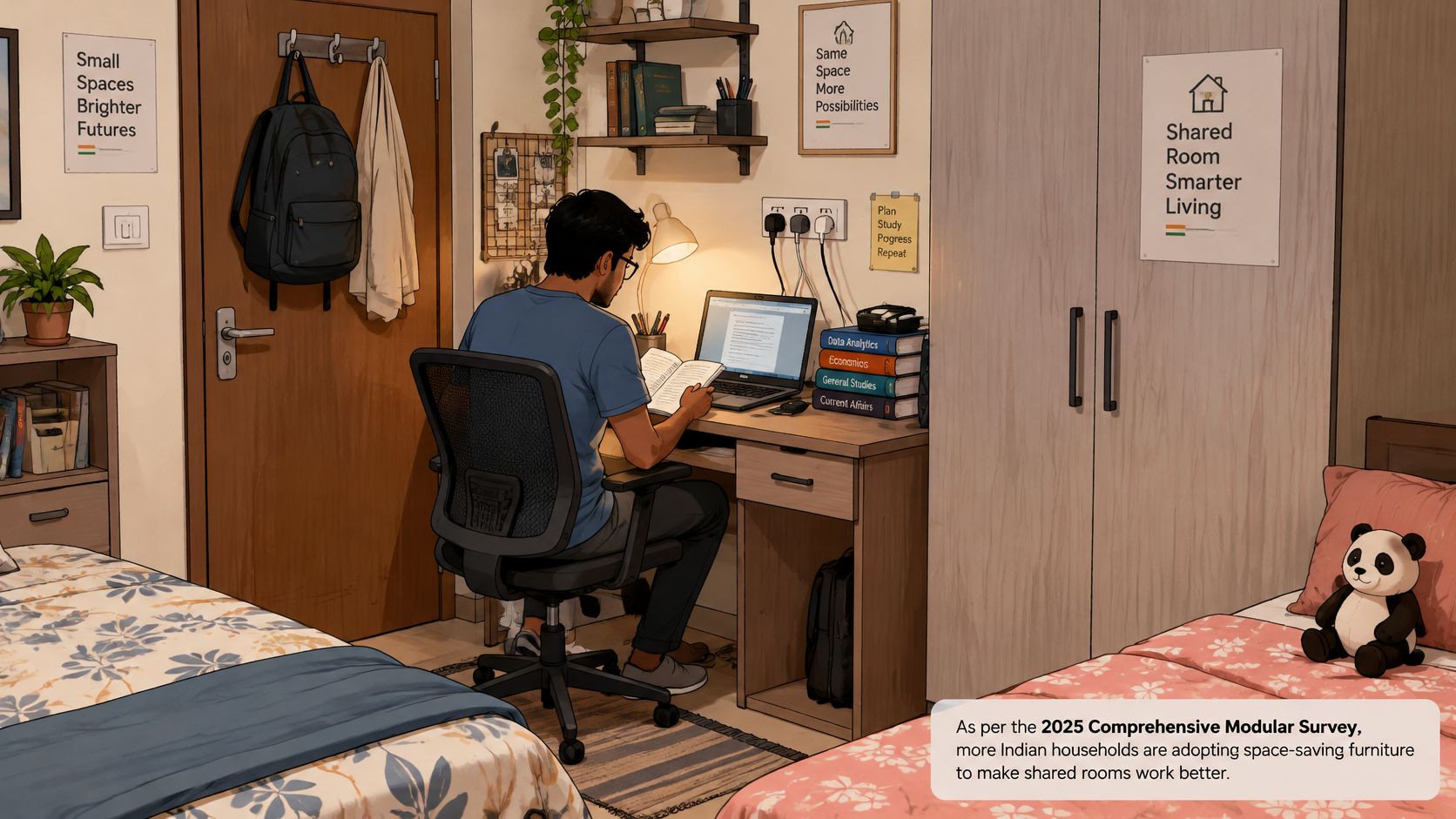
The 2025 Comprehensive Modular Survey reported that 86.3% of Indian households had internet access within the premises, 91.6% in urban areas and 83.3% in rural areas. That figure measures access inside the home, not how many desks people buy. It does explain why one adult study table now doubles as a laptop, online-meeting and charging station, often shared with someone else in the same room.
Five layouts and what each gives up
Shallow desk: A top nearer 600 mm deep fits a tight wall and still holds a laptop. With a monitor, check viewing distance and keyboard space carefully; a deeper top or suitable monitor arm may be more practical.
Wall-adjacent desk: Pushing the back to the wall saves floor area and keeps the room walkable. Cable access, heat from a laptop, and cleaning the skirting all get harder. Leave a finger gap, or a small service gap, if the socket is low.
Fold-away top: Useful when the table is occasional and the bed needs the floor at night. Hinges and supports eat knee room, and a folded top is a poor place for a monitor you use daily.
Concealed cable channel: Hides chargers and a power strip so the shared room doesn't look like a workshop. A channel that is too tight traps heat and makes a dead charger painful to reach. Size it for the fattest adapter you own.
Monitor riser: Lifts the screen toward eye level without a second desk. It also steals depth. On a shallow top, the keyboard then hangs over the front edge.
A short walk-through of how a made-to-measure top is planned for a real room helps before you lock a layout.
Maximising storage can reduce leg clearance and make the desk less comfortable. Lockable storage is worth it for a shared room, but put it to one side, not as a deep stack under the writing position. Before you order, mark three things on a sketch: where the power point sits, how the door swings, and whether the table must shift between study, remote work and shared use.
Materials, Storage and Build Quality
Material choice decides how a study table ages. A top that stays flat through humid monsoons and daily laptop heat costs less per year than a cheaper board that swells, peels and gets replaced.
An Economic Advisory Council analysis reports that average urban per-person monthly spending on durables rose from ₹315 in 2011–12 to ₹877 in 2023–24, an increase of 178%. The figure tracks durable goods as a whole, so treat it as context rather than desk demand. Higher spending alone does not establish better product quality or longer service life. Compare a work table on its construction, fit, storage and finish rather than using this spending trend as evidence of durability.
| Material | Strengths | Trade-offs | Best fit |
|---|---|---|---|
| Solid teak | Dense, stable in humid conditions, long-lasting | Higher upfront cost and weight | Daily work desk meant to last for years |
| Solid oak | Strong, distinctive grain, durable finish | Heavy, needs regular finish care | Study table that anchors a room |
| Engineered wood or particleboard | Lower upfront cost, uniform surface | Can swell, warp or peel in humidity | Light or occasional use |
Match the board to the hours you sit at it. A desk in daily use can justify teak when you value a repairable solid wood top and a material suited to the intended use. Teak still needs appropriate construction, a suitable finish and care; it is not immune to moisture-related movement. An occasional reading table can live with engineered wood, provided it stays off a damp external wall and away from a window that leaks in the rain. Weight cuts the other way: oak and teak tops are hard to shift, so a desk that must move between rooms argues for a lighter build. If you are weighing a solid top against a thin face veneer, this solid wood and veneer comparison sets out how each behaves in Indian humidity.
Storage that doesn't steal your knees
Every drawer or side cabinet takes space from your legs. Favour one shallow drawer, an open shelf and a cable tray over a deep stack of boxes. A leather pull or a slim hidden shelf adds function without bulk.
Before you buy, check the drawer glides, the joinery and the finish. Then pull the drawer with the chair in its normal position. If your thigh meets the box, the storage sits in the wrong place. For a solid wood top, follow the workshop's care advice for its particular finish and keep standing water off the surface. Recoating intervals depend on the finish and condition, rather than a fixed seasonal schedule.
Measure Your Room and Order a Study Table in Bangalore
Bring a tape, the chair you sit on, and a phone photo of the wall with the socket. Guessed widths are how good tables end up blocking doors.
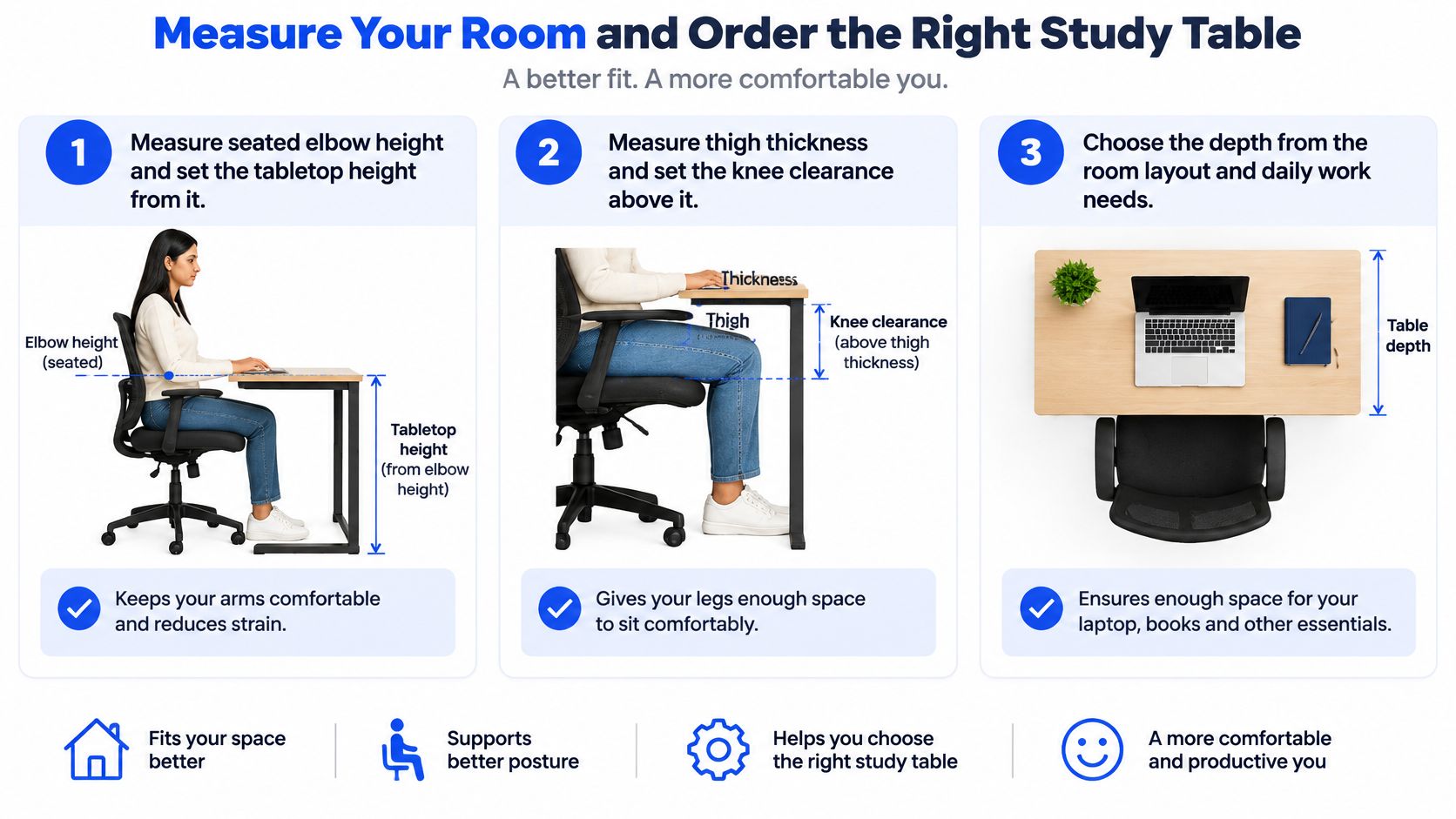
- Measure seated elbow height and set the tabletop height from it, with your feet flat and your shoulders relaxed.
- Measure thigh thickness while you are on that chair, then set knee clearance above it so a drawer can't touch you.
- Choose depth from the screen. Use 600 mm for a laptop and about 750 mm when a flat-panel display sits on the top.
- Measure the room. Note width, door swing, wardrobe position and the exact height of the power point.
- Decide storage last. Place drawers and shelves so they don't cut into leg room or the chair's path.
- Choose the material for humidity and for how many hours a day the top will be used.
- Note the daily hours and whether the table must move between study, remote work and shared use.
- Share measurements and reference photos with the workshop, including a shot of the chair from the side.
The order matters. The chair fixes your elbow height, the elbow fixes the top, and the top decides where a drawer can safely go. Reverse that sequence and you end up trimming a desk to fit a socket, or sitting twisted so the wardrobe door can still open. In a shared room, measure twice: once for your posture and once for everyone who walks past the chair.
A desk that stands away from a wall shows its rear face to the room, so check that side is finished before you commit to any piece. For a design starting point, the Amelia Teak Study Desk is made entirely in teak, including its back. Its finished rear allows placement away from a wall. Check its listed depth against your equipment and the space you need; a compact writing desk may not suit every monitor setup.
Before a piece is made, we talk through room size, clearance, storage and seating with you. The same habit we use on a custom dining table applies here: wood, top profile, base dimensions and the final seating arrangement are confirmed with Gulmohar Wood Works before ordering. Share your chair measurements and reference photographs so the chair and top can be specified together. Custom work starts from those notes on our made-to-measure solid wood furniture page.
Take these measurements this week, then send them for a dimension review before you order. A table cut to the room and to your elbows will outlast one chosen from a width on a label.
Gulmohar Wood Works makes custom solid teak furniture, including study tables and desks, at our workshop in Lingarajapuram, Bengaluru, using your room measurements, clearances and material preferences. If you are sizing a study table for an adult around daily hours, a shared room and a fixed power point, send those measurements and we will confirm dimensions before anything is made. Browse our wooden study tables and desks in Bangalore, then share your room measurements through our custom furniture enquiry page.